Have you ever written a post that you feel deserves extended exposure? Doing so is easily possible with WordPress’ “sticky” feature. In the admin menu Posts > All Posts just hover over a chosen post and click the “Quick Edit” link and check the Make this post sticky box. Or Click the “Edit” link and from […]
Fullscreen mode

If you prefer to clear the clutter when writing in WordPress try the ‘Distraction Free Writing mode’ button. The fullscreen setting will instantly transform your screen into a minimalist heaven. If the toolbar disappears when you are in fullscreen mode and you want to Exit fullscreen or use one of the formatting buttons, just move your […]
Get Notifications

Facebook Page Admins: Likers\followers can opt-in to receive notifications whenever your page makes a post – like they receive notifications when a friend comments on their status or invites them to an event. For Likers to Activate Notifications for a Page: 1.Navigate to a Page. 2.“Like” the Page and continue hovering over the “Like” button […]
Navigating Sheets

It’s common knowledge and instinctive to click on a different sheet tab in a workbook to activate it. You can also use the keyboard; press Ctrl-Page Up and Ctrl-Page Down to go up and down the sheets. If your workbook contains a large number of sheets they may not all fit on the screen and it […]
What is browser cache?
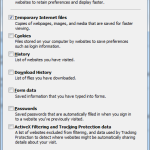
Your web browser stores a temporary copy of every site you visit on your computer. These temporary Internet files are known as cache. Files that are cached locally include any documents that make up a website: html files, CSS style sheets, JavaScript scripts, as well as graphic images and other multimedia content. When you revisit […]
Delete all data after incorrect passcode

Passcode Denied – DELETE ALL! If you’re carrying around sensitive data, you can now enable a feature that’ll erase all the data on your iPad after 10 failed passcode attempts. Navigate to Settings > General > Passcode Lock > Erase Data. Not to be recommeded if you’re naturally forgetful or have children that might get hold […]
Split full names in single column

How to split full names (in a single column) out into separate columns. Use functions: =LEFT(B4,FIND(” “,B4,1)-1) =RIGHT(B4,LEN(B4)-FIND(” “,B4,1))
Page Numbering

To insert Page Number click the Insert tab. In the Header & Footer group click Page Number. Select position of page number (Top of Page = Header, Bottom of Page = Footer, Page Margins = left or right and Current Position = at your current cursor point). Once position has been selected you will see various options […]
View Full Screen
Sometimes it’s useful to enlarge your window when viewing websites, photos and videos and go full screen by losing the header bars at the top and the taskbar at the bottom (if the taskbar isn’t locked in place). Open any webpage in a browser, or a photo in Windows Photo Viewer, or open a photo […]
Re-open closed browser tabs
Accidentally closed a browser tab? Instead of trawling through the browser history, get a recently closed browser tab back by using the Ctrl+Shift+T shortcut key. This will quickly re-open that tab. Use the shortcut keystroke again and it’ll open the tab you closed before that, and so on. This should work in IE, Firefox and Chrome, indeed […]