Outlook 2010: Reduce your mailbox size by going to File > Info > Cleanup Tools. Two quick options to actually reduce your mailbox size are: Find items by size and\or age and delete Find items older than ?90? daysFind items larger than ?250? kilboytes. You can amend and enter an appropriate figure into the given […]
Custom format a telephone number
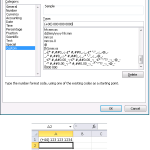
Want to format a phone number? Use Ctrl+1 to bring up the Format Cells dialog box. In the Type: text box enter (+00) 000 000 0000 for 2 digit country codes.
Quickly Sum Non-Contiguous Cells
Click the AutoSum button. Then, one at a time, click each of the cells you want to sum, typing a comma to separate each cell in the formula (e.g. =SUM(C8,D10,F8,H8,J8). Another option is to hold down the CTRL key (instead of typing the comma) as you are selecting the cells. You can also drag to […]
Quick Navigation
When you press the Ctrl key combined with any arrow key (north, east, south, or west), you jump to the last populated cell in that direction.
Remove Formatting
Select text; Ctrl+Spacebar will remove all formatting from the highlighted text.
Repeat Action
To repeat the last action that you’ve just taken, select a cell or a range of cells where you want to repeat it and press the function key – F4. You can repeat this over and over.
Today’s Date
To insert Today’s date use Ctrl+; (semicolon) on the keyboard.
Cell Navigation
To move through a group of cells that you’re working on (without going outside the range) highlight the group of cells and then use the “Enter” key to move through them.
Format Painter

MS Office Tip: Double-clicking on the Format Painter icon will cause it to “stick”, so that you can continue to apply the desired format to multiple places. To turn this tool off, either press the Esc key or click the Format Painter icon again.
Hide the Ribbon Bar
CTRL+F1 to toggle between hiding/un-hiding the Ribbon Bar in 2010.