Have you ever written a post that you feel deserves extended exposure? Doing so is easily possible with WordPress’ “sticky” feature. In the admin menu Posts > All Posts just hover over a chosen post and click the “Quick Edit” link and check the Make this post sticky box. Or Click the “Edit” link and from […]
Fullscreen mode

If you prefer to clear the clutter when writing in WordPress try the ‘Distraction Free Writing mode’ button. The fullscreen setting will instantly transform your screen into a minimalist heaven. If the toolbar disappears when you are in fullscreen mode and you want to Exit fullscreen or use one of the formatting buttons, just move your […]
Get Notifications

Facebook Page Admins: Likers\followers can opt-in to receive notifications whenever your page makes a post – like they receive notifications when a friend comments on their status or invites them to an event. For Likers to Activate Notifications for a Page: 1.Navigate to a Page. 2.“Like” the Page and continue hovering over the “Like” button […]
Navigating Sheets

It’s common knowledge and instinctive to click on a different sheet tab in a workbook to activate it. You can also use the keyboard; press Ctrl-Page Up and Ctrl-Page Down to go up and down the sheets. If your workbook contains a large number of sheets they may not all fit on the screen and it […]
What is browser cache?
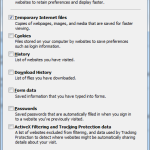
Your web browser stores a temporary copy of every site you visit on your computer. These temporary Internet files are known as cache. Files that are cached locally include any documents that make up a website: html files, CSS style sheets, JavaScript scripts, as well as graphic images and other multimedia content. When you revisit […]
Delete all data after incorrect passcode

Passcode Denied – DELETE ALL! If you’re carrying around sensitive data, you can now enable a feature that’ll erase all the data on your iPad after 10 failed passcode attempts. Navigate to Settings > General > Passcode Lock > Erase Data. Not to be recommeded if you’re naturally forgetful or have children that might get hold […]
Split full names in single column

How to split full names (in a single column) out into separate columns. Use functions: =LEFT(B4,FIND(” “,B4,1)-1) =RIGHT(B4,LEN(B4)-FIND(” “,B4,1))
Page Numbering

To insert Page Number click the Insert tab. In the Header & Footer group click Page Number. Select position of page number (Top of Page = Header, Bottom of Page = Footer, Page Margins = left or right and Current Position = at your current cursor point). Once position has been selected you will see various options […]