Found some text or a URL on a webpage that you want to enter into the address bar of your browser quickly? Select the text, use Ctrl+C to copy, Ctrl+T to open a new tab, Ctrl+V to paste and then finally Enter to search. May seem long winded but quicker than your mouse once you […]
Open a new tab quickly
To open a new tab quickly use Ctrl+T
Custom format a telephone number
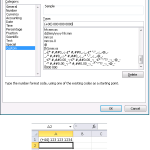
Want to format a phone number? Use Ctrl+1 to bring up the Format Cells dialog box. In the Type: text box enter (+00) 000 000 0000 for 2 digit country codes.
Increase space and optimise HDD
Want to increase space on your Hard Disk Drive? Freeware CCleaner (free without support) will delete unnecessary files and will help to keep your computer running faster. CCleaner contains a fully featured registry cleaner. Very good – recommended software.
Date webpage last updated
Not clear when a webpage was last updated. Type javascript:alert(document.lastModified) into the address bar. (If you copy and paste you may need to retype javascript: back in as it gets stripped out sometimes). A lot of websites are generated dynamically by a script (e.g. PHP or other server side script) that runs on the server […]
Find out about your PC
Want to know which version of Windows you have, how much memory you’ve got installed and how fast your CPU (Central Processing Unit) is? Click on Start, right click on (My) Computer, select Properties.
Enlarge and reduce text in browser
Browser Tip: Press CTRL+ (plus sign) on your keyboard to enlarge text while using Google Chrome, Internet Explorer or Firefox. Press CTRL- (minus sign) to reduce the size again.
Memory Upgrade
Need a Memory (or Solid State Drive) upgrade for your device? Highly recommend http://www.crucial.com/uk/ Helpful site – lots of instruction. Recommended.
Quickly Sum Non-Contiguous Cells
Click the AutoSum button. Then, one at a time, click each of the cells you want to sum, typing a comma to separate each cell in the formula (e.g. =SUM(C8,D10,F8,H8,J8). Another option is to hold down the CTRL key (instead of typing the comma) as you are selecting the cells. You can also drag to […]
Quick Navigation
When you press the Ctrl key combined with any arrow key (north, east, south, or west), you jump to the last populated cell in that direction.